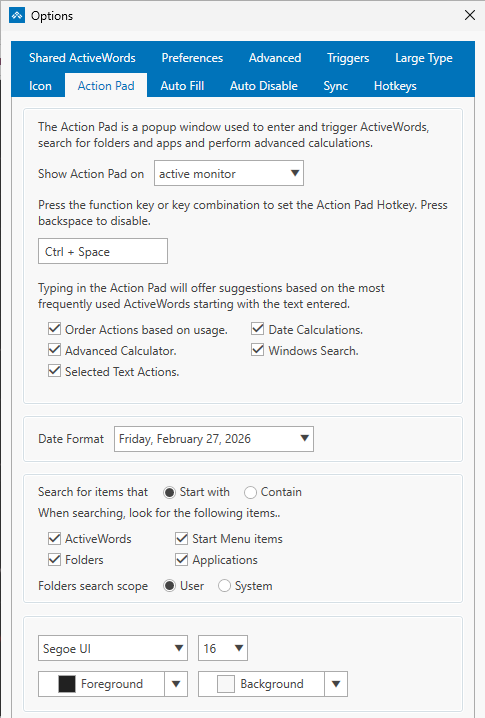
The Options → ActionPad tab is where you configure everything about the ActionPad: what appears when you search, how search works, and how the ActionPad looks. This FAQ describes each option on the tab.
Where to Find It
Right-click the ActiveWords icon (system tray or floating icon) and choose Options. Open the ActionPad tab. In ActiveWords 5, the ActionPad hotkey is configured only here, so all ActionPad settings are in one place.
ActionPad Hotkey
Set the key combination that opens the ActionPad (default: Ctrl+Space). This is the only place in Options where you can change the ActionPad hotkey.
What Shows in the ActionPad
Use the toggles on this tab to choose what the ActionPad searches when you type. You can turn each category on or off:
- ActiveWords – Your Words and their associated actions
- Folders – Files and folders on your computer (requires Window Search to be enabled)
- Applications – Installed programs, including packaged apps from the Microsoft Store (requires Window Search to be enabled)
- Start Menu items – Programs and shortcuts in the Windows Start Menu (requires Window Search to be enabled)
- Selected Text actions – Type or paste text, press Enter, and choose an action (e.g., Google Translate, Bing search) to run with that text. See Selected Text.
- Advanced Calculator – Math expressions in the ActionPad (e.g.,
25*4). See Advanced Calculator. - Date Calculations – Date arithmetic in the ActionPad (e.g.,
today+1month). See Date Calculations. - Windows Search – When enabled, the ActionPad can search your computer for folders, applications, and Start Menu items. See Windows Search.
Windows Search Options
When Windows Search is enabled, two additional settings control how search works:
- How search matches – Starts with (results must begin with what you type) or Contains (results can match anywhere in the name)
- Where to search – System (entire computer) or User (only files and folders under your user profile)
See Windows Search for details.
Appearance
The ActionPad tab also includes appearance settings: font size, color, and other display options.
Related FAQs
- ActionPad – Overview and how to use the ActionPad
- Selected Text – Act on highlighted or pasted text
- Advanced Calculator – Math in the ActionPad
- Date Calculations – Date arithmetic in the ActionPad
- Windows Search – Search folders, applications, and Start Menu
- Hotkeys – Other hotkeys (ActionPad hotkey is set on this tab only)